
This article will show the employee how to use a mobile device to complete a vehicle inspection.
First you will tap the Driver 360 App on your zebra:

The first time you open the app you will register by entering your information:
Use your employee ID as your password.

Next tap on the menu at the top left:
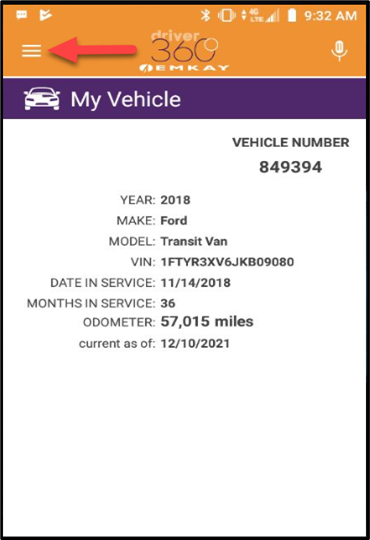
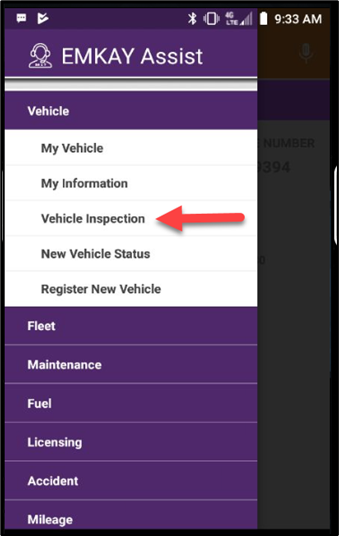
Select Vehicle on the top:

Then the third option "Vehicle Inspection"
Tap on "New Report"

The first question is the odometer:
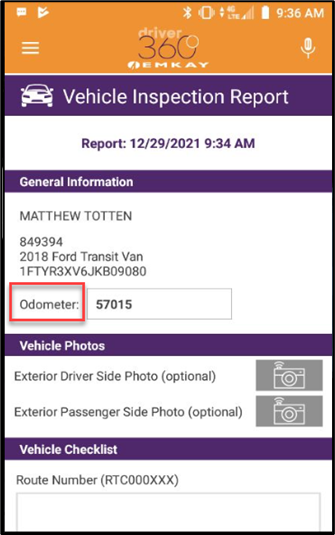
Then enter your route number and answer the 5 questions below:

For any question with the answer "YES" you will touch "Add Damage Item"

Tap on the van until it is showing the damaged area:

Use the camera to take a picture of the damage.


Once the picture is taken you can enter notes:

Click "OK" and "Send Report"


That's it!

The inspection is complete. You can view completed reports here.
Comments
0 comments
Please sign in to leave a comment.